Every offload lands in a folder named after the card, and when you build your own folders, one of the levels can be the camera. Both names are yours to set. The camera name is free text: "Sony FX6", "A-Cam", "Nina", or "FX6 · Nina" all work, and the folder simply follows. That one fact is most of this article - the rest is where to click.

Name a camera once, everywhere
When you add a card from a camera Stow has not met, it asks you to name it. Whatever you type becomes that camera's folder name from then on - and the name is carried onto every destination drive during offloads, so every machine running Stow learns it. Name the body once at the start of a job and it is done for the season.
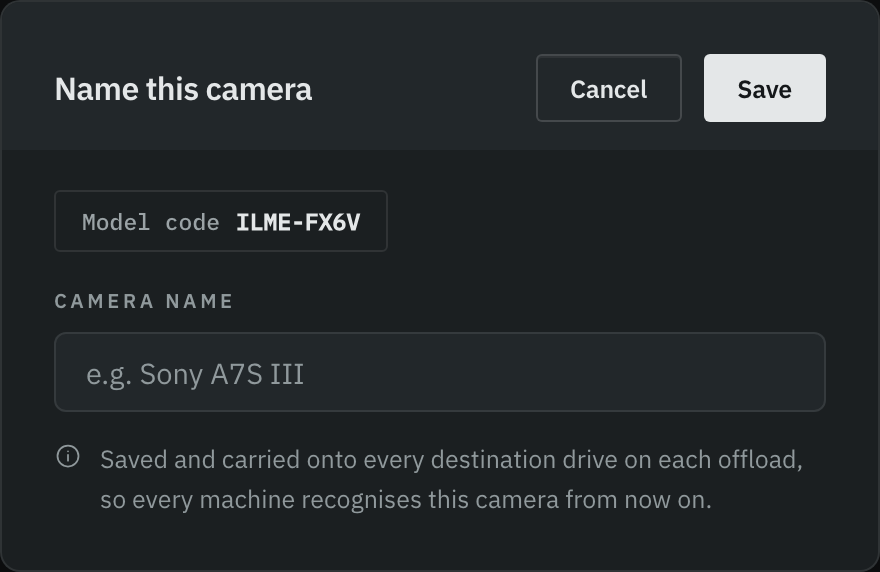
The dialog appears on its own, and only for a camera's first meeting - once a body is named, Stow stops asking. Camera detection is automatic and fully offline - no account, no internet needed.
One honest limit: the prompt needs the card to report a model code, which most cameras write and some devices do not. A source with no readable code shows as Unknown source. Name the card instead, and build your folders with a Name folder if you want the source in the path.
Two identical cameras on one shoot
Both cards say the same camera, and the edit wants to know which was which. Give each card its own name, like A001 and B001, and each lands in its own folder. Or choose Build my own folders and add a Name folder, such as A-Cam, above the card. The camera's remembered name is untouched either way.
Naming by operator, for bigger teams
On drama and commercial sets the convention is camera letters and roll numbers, and the operator's name lives in the camera report rather than the folder tree. But on events, documentaries and multi-shooter jobs, kits are personal - three devices carried by one person are more usefully filed under that person's name than under three model numbers.
Stow supports both without a setting: when Stow first meets a body and asks for a name, give it the operator's. "Nina" as a camera name means everything that body shoots files under Nina, on every machine. For a camera that already carries a name, use the per-card label - a few seconds per session. And if your team runs several devices per person, a combined label like "Nina · FX6" keeps both facts in the path.
The card name matters too. The name at the top of the card becomes the last folder in the tree. Stow suggests one from the card itself; change it before you add the card to the queue.
Stow is free for macOS and Windows. If you have not tried it yet, the download is here.