You are about to format a card. How sure are you?
Copying footage is the easy part. The harder question is whether the copy is actually good. Stow reads every file back from the destination drives, compares it with the card, and gives you one answer for each card: safe to format, or not yet.
Using Stow on real jobs? Help shape what we build next.
Help shape Stow
Stow is on its way.
It should be in your Downloads folder. While it lands: leave your address and I will tell you what changes in each version, and why.
One email to confirm your address. After that, only when there is something worth sending.
What the people using it say
“To be honest, we’re actually already saying goodbye to OffShoot because of Stow.”
Robert · manual films, Switzerland
“I needed a download app for a film shoot; after trying out several, I settled on Stow, which turned out to be a great product, because it does what it’s supposed to do well, has the drive to improve, and is also free.”
“For a one man band like me this makes so much more sense than the paid options that are more directed towards huge productions.”
“I love how this program has changed my workflow and gives me comfort knowing that I can erase my cards with ease, knowing that it’s on two different drives.”
4.8average rating · 800+ downloads since July 2026
Using Stow? Rate it here, it takes a minute and it comes straight to me.
What is actually at stake
Once the card is formatted, the original is gone.
A failed offload can mean losing footage you cannot simply recreate.
Then there is the client conversation, working out what can be recovered or reshot, and whatever that costs in time, money and trust.
That is why knowing a copy has finished is not quite enough. You need to know it is good.
How it works
Card in. Verdict out.
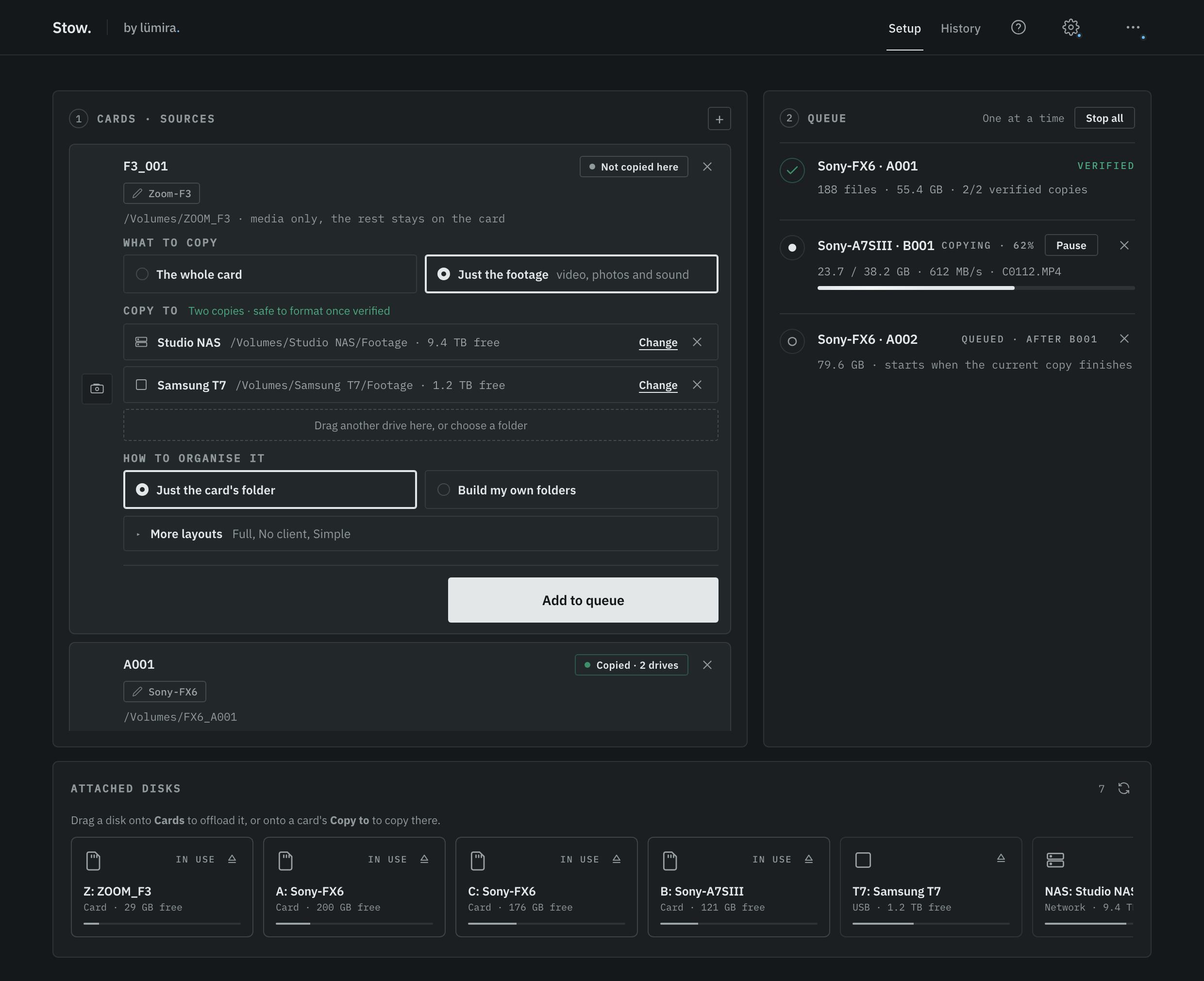
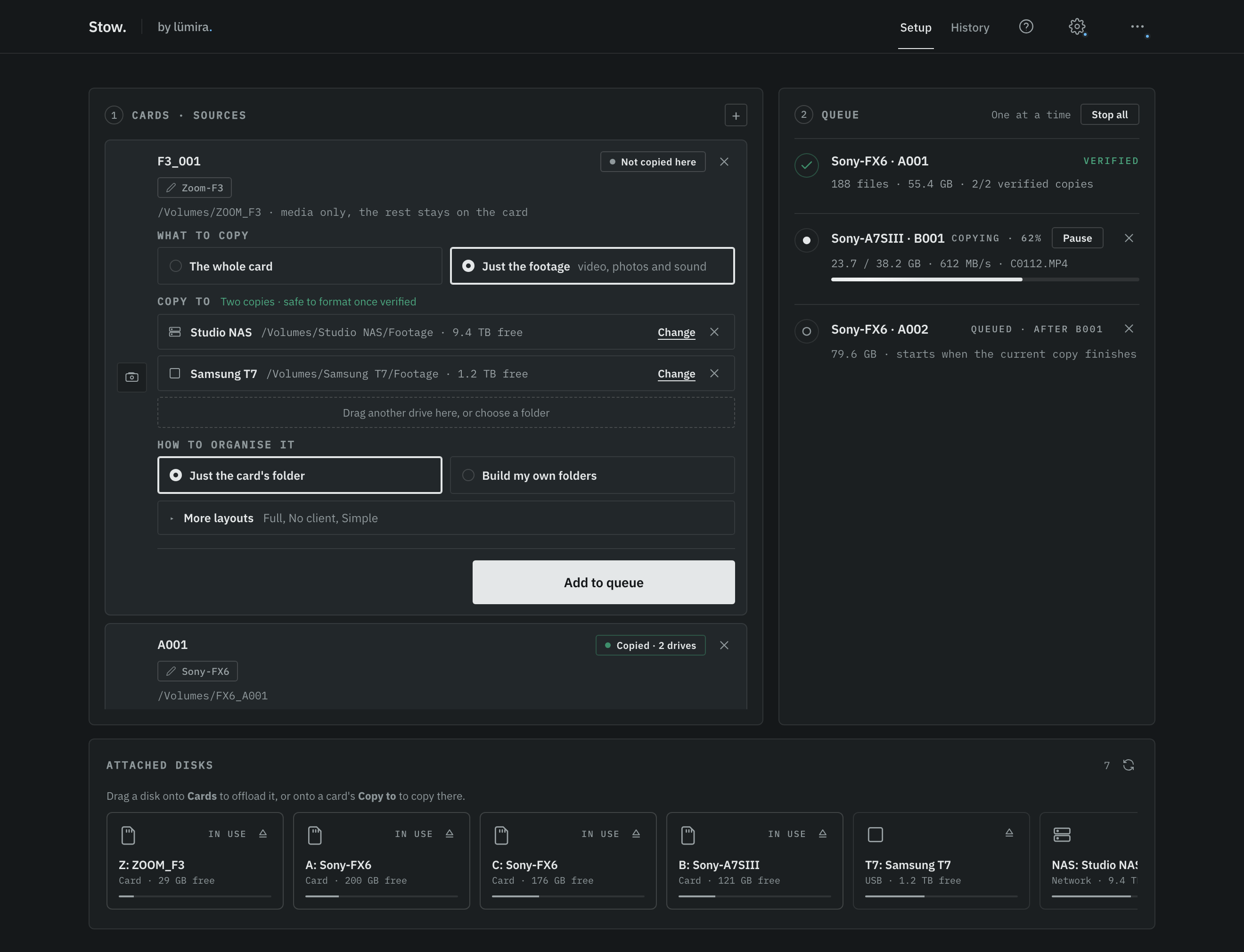
Drag the card in
Stow names the camera for you. Choose where the card goes and how the folders look. The next card starts with the same choices.
Line them up
Add each card to the queue, then press Start copying. Each card is read once and written to every drive you picked at the same time.
Read the verdict
Stow checks every copy off the disk. Each card gets its own answer as it finishes: safe to format, or not yet.
Cards on the left, the queue on the right
Why we built it
Stow started after I lost footage on a shoot.
We were in Lyon, filming for a business school. At the end of the day I copied the cards to an SSD in the hotel room, opened a few clips to make sure they were there, and went down to dinner while it finished.
Back in England the cards had already been reused on the next job. When I sat down to edit, days later, some of the footage was not there.
Nothing had told me. The copy looked finished. The clips I opened played perfectly. The ones I did not open were the problem.
I didn't want to be in that position again. I wanted something that could tell me when the card was actually safe to format, rather than opening a few clips and hoping for the best.
Built by a production company, shaped by the people who use it.
See what Lumira makes
"On a busy multi-camera day, there is always a card you are not sure is safe to format. We built Stow so we never have to guess."
Thank you
Shaped by the people who use it.
More than 800 of you have downloaded Stow since July, and a good number of you have written in as well: a date you wanted kept on every drive, a disk you wanted to place yourself, a mode you needed for your jobs.
Many of the changes in 0.7.0 came from those emails. Thank you for trusting Stow with your footage, and for telling us what would make it work better on your shoots.
Luke, Lumira Studio
Changed because you asked
- Copies keep their Created date on every driveFrom a user who compared three drives side by side and wrote in.
- Just the footageAsked for more than once: the video, photos and sound off a card, without the camera's other files.
- Offloading to a NAS from a MacAsked for from a real job, and in the release that followed.
- Contact us, straight from the appShaped by a user who wrote in by email. Every message now comes straight to me.
Help shape Stow
Stow is changing quickly. A new version goes out most weeks, and many of the improvements since launch have come from people using it on real jobs and telling me what worked, what got in the way, or what they wished it could do.
That feedback matters more than it might seem. There is no way we can recreate every camera, card, reader, drive and workflow ourselves. Your kit and your day are the test we cannot run.
If you use Stow, I would like to hear from you. Join the list and I will send a short note when there is an update worth knowing about: what changed and, where it came from someone's feedback, why. Reply to any email. I read the replies myself.
Stow is free and it stays free. The more real workflows we learn from, the more dependable it gets for everyone who uses it.
Luke, Lumira Studio
One email to confirm your address. After that, only when there is something worth sending. Unsubscribe any time.
Why verification matters
A finished copy has not necessarily been checked.
When you drag a card onto a drive, Finder or Explorer tells you when the copy has finished. It does not then read every file back from the destination and compare it with the card.
That is the extra step Stow adds. It reads the files back from the drives, bypassing the computer's memory cache so the check proves what actually landed on the disk, and compares every file against the source before it gives you a verdict.
The verdict
One answer for the whole card.
Safe to format means Stow has at least two verified copies on separate drives, with every file checked against the source.
Not yet means that threshold has not been met. Stow shows you which copy or file needs attention.
We built it for our own studio, and made it free. No trial, no account, no paid tier behind it.
Stay in touch
- Have your say. If there is something your workflow needs, tell us. That is how most of it got built.
- Never miss an update. A short note when there is a new version, so you are not running last year's copy on a job that matters.
- First look at what we make next. Stow is not the only tool we build for our own shoots, and they are all free.
Help shape Stow
The best ideas have come from other crews.
Stow started as our own problem. Almost everything good about it since has come from other crews telling us what they needed. We would like to hear from you too, and you will be first to know when there is a new version or a new tool.
One email to confirm it is you, then nothing until there is something worth saying. Unsubscribe any time, and your address stays with us.
How it compares
Every tool here verifies. Only one gives a verdict.
The paid tools are good at what they do. Here is where Stow sits.
| Feature | Stow | OffShoot (Hedge) | ShotPut Pro | Pomfort | Resolve Clone |
|---|---|---|---|---|---|
| Price | Free | $169 to $249 one-time | $169 one-time + updates | $199 to $899 / year | Free, in Resolve |
| Genuinely free version | Yes | No (10-day trial) | No (trial) | No (trial) | Yes |
| macOS and Windows | Both | Both | Both | Mac only | Both |
| Verified, checksummed copy | Yes (xxHash) | Yes | Yes | Yes | Yes |
| Reads card once, at least two drives at once | Yes | Yes | Yes | Yes | Limited |
| MHL manifest | Yes | Yes | Yes | Yes | No |
| Safe-to-format verdict | Yes | No | No | No | No |
| No subscription lock-out | Yes | Yes | Yes | No | Yes |
| Camera auto-detect and filing | Yes | Yes | Yes | Yes | Basic |
All five tools checksum a copy. Stow is the only one that turns those checks into a clear answer: this card is safe to format.
Competitor pricing is in USD and indicative. OffShoot and ShotPut Pro were checked on their own sites on 25 September 2026, Pomfort in June 2026. The paid tools run from $169 one-time to $899 a year, and the subscription option is Mac only. Subscription tools revert to read-only when payment lapses. Stow is free on both platforms, with no account.
What's inside
Everything needed to clear a card. Nothing else.
Every feature is here to get the card off, and to prove it is off.
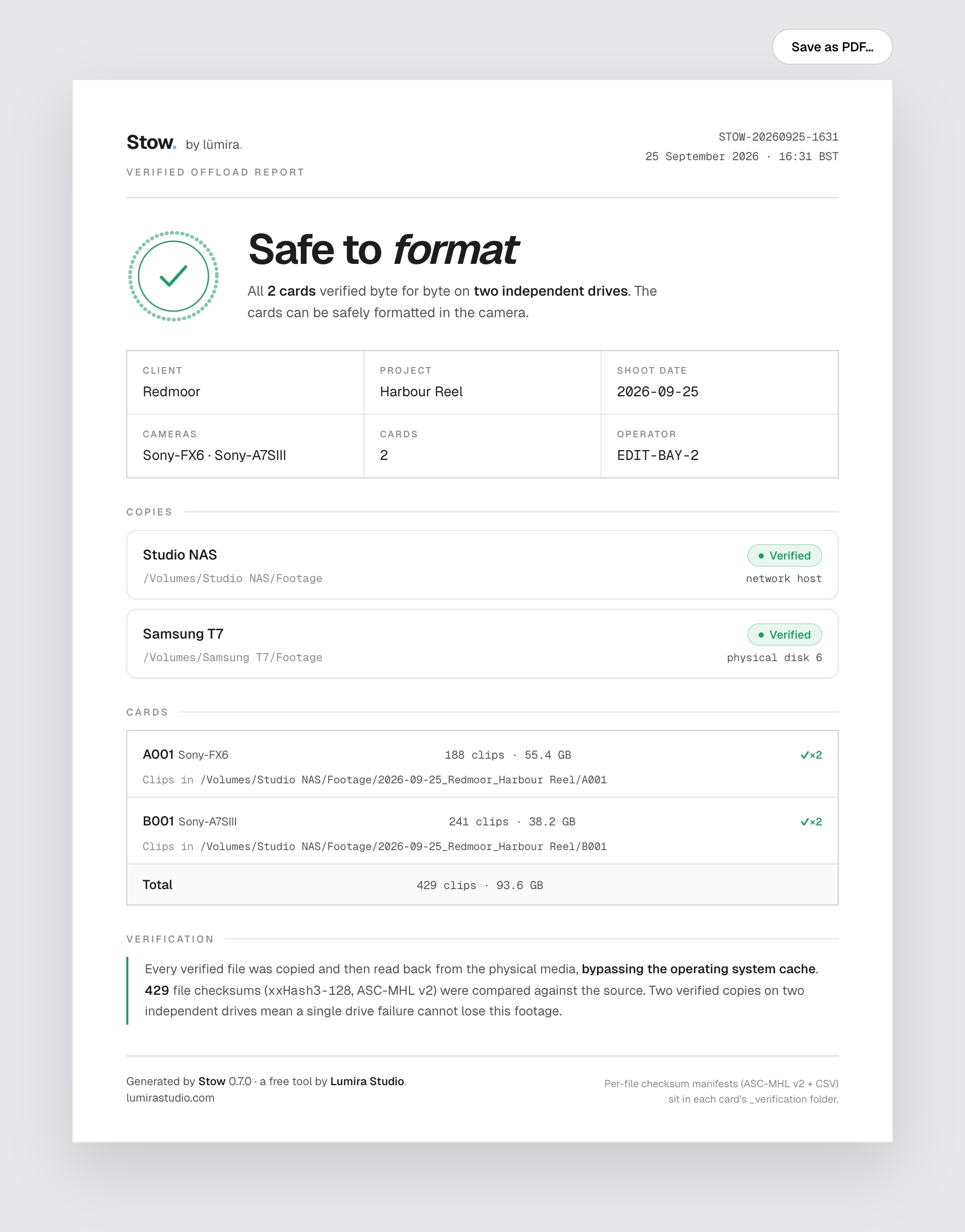
A report you can hand to a client.
Every offload writes a one-page report onto each drive. It says what was copied, what was checked and whether it passed, and it prints straight to PDF. Nobody has to take your word for it.
- The safe-to-format verdict, in plain words
- Per-card clips, size and verified copies
- Read back off the disk, checked with xxHash3-128 and ASC-MHL v2
- A checksums.csv beside every manifest, openable in a spreadsheet
Set up every card, then start
Nothing copies until you say so. Set up each card, add it to the queue, and press Start copying. A card you add while a run is going waits its turn.
History
Every card this computer has offloaded, by day, with its verdict and the folder the footage went to. Search by card, camera or folder, and open the folder from the row.
Verified copy
Stow does not trust the copy. It reads every file back off the drive afterwards and compares it with the card.
Every drive at once
The card is read once and written to all your destinations at the same time, so two backups take about as long as one.
Load the day's cards and walk away
Add every card to the queue and press Start copying. Stow copies them one after another, so each card gets the drives to itself. All at once is under Settings > Advanced.
Every card, its own setup
Send the FX6 card to the NAS and the sound card to the SSD in the same run. Each card keeps its own drives, its own folders, and the whole card or just the footage.
Folders the way you file
Build the folder path from Date, Client, Shoot name, Camera and your own names, in any order, and save it as a layout. Or keep it simple: just the card's folder.
Just the footage
Copy only the video, photos and sound from a card, and leave the camera's housekeeping files behind. Every file copied is still checked.
Pause, or take a card out
Pause a copying card to give another card the drives; the queue waits until you resume. Take a card out with its × and what is already checked stays on the drives, so adding it back copies only what is missing.
Wrap a finished card
Once a card is safely backed up, Stow can leave a mark on it so the camera asks to format it the next time it goes in. Some people call it a zombie format. It means a finished card never looks like an unshot one in the pouch. Off unless you switch it on, and Unwrap puts it straight back.
A note on your phone
Walk away and get a message on your phone when the card is done. Optional, and off until you set it up.
It just opens
No security warning to click past. Both the Mac and the Windows version are properly signed, so your computer already knows who made it.
Proof that outlives us
A small record of every file travels with the footage, so any other tool can prove it is intact years from now. It is called an MHL manifest, and post houses know it.
It knows which camera
Stow reads the camera from the card and files the footage the same way every time, so you are not renaming folders at the end of the night.
Eject from the list
Every disk in the list has its own eject button, so you are not hunting for the card in Finder or Explorer.
macOS and Windows
The same app, and the same answer, on a Mac or a PC.
Local and private
No account, and nothing uploaded. Your footage never leaves your machine, and neither does anything about the job.
Re-check a backup
Worried about an old job? Choose Re-check a backup from the ··· menu, point it at a folder Stow copied months ago, and it checks every file again, then names any that have gone bad.
Blog
The bits worth knowing.
Offloading is full of quiet traps: the reader that throttles your card, the copy that was never checked, the drive that lies. Plain explainers, for people who like to know why.
Stow passes 500 downloads in a month
What happened when a free offload tool from a small studio met the people who actually copy cards for a living.
Read WorkflowTeraCopy, camera cards, and the tool we ended up building
A good file copier is not a card offloader. What we learned on our own shoots, and why the thing we built is free.
Read ComparisonShotPut Pro alternatives: what working crews actually use
What the offloaders really cost in 2026, where each one earns its money, and where a free tool is enough.
Read Start hereHow Stow works, and what each result means
The complete guide: how a copy is proved, what green, amber and red mean, and exactly what to do when a copy will not verify.
Read Release notesWhat's new in Stow 0.7
Set up every card first, then start the queue with one press. Each card keeps its own drives and folders, and History remembers where everything went.
Read HardwareWhy your CFexpress card is not hitting full speed
Most shooters are capped by the reader. How to tell, and the one upgrade that helps most.
Read VerificationWhat "verified" actually means
Reading every byte back off the disk, versus checking a file size. Only one is worth trusting before you format.
Read StorageYour Mac does not checksum your footage
APFS checksums its own metadata. Your clips get no such protection, and an app-level read-back is the only real proof.
Read WorkflowTwo copies, two drives, then format
The 3-2-1 rule on set, and why a single backup is a single point of failure.
Read Under the hoodChecksums, plainly
xxHash, MD5, SHA. What each one proves, what none of them do, and which one a card offload needs.
Read SpeedCopy once, verify in the background
How a card reaches two drives at the same time, and where the waiting really goes.
ReadMore as we ship.
Part of Miracue
The rest of the shoot, from the same studio.
Stow looks after the cards at the end of the day. Miracue looks after the rest of it, with free tools for planning the shoot and running the day. Like Stow, no account and no email.
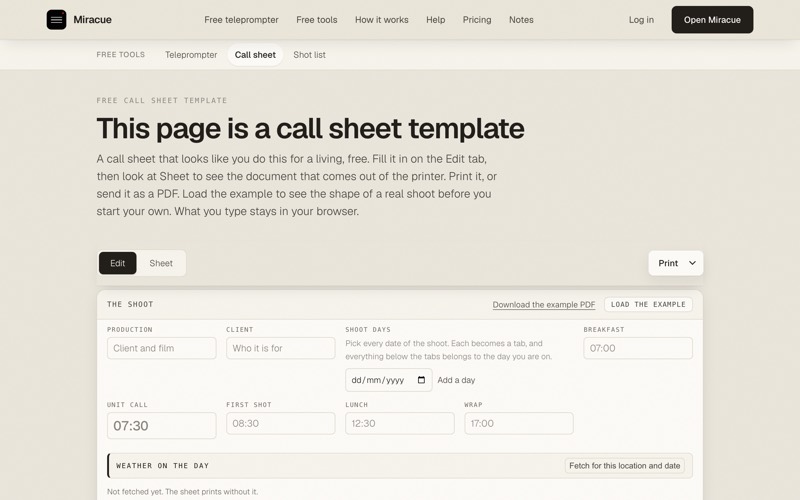
Free call sheet template
Who, where and when, on one page for the crew. Fill it in, then print it or save it as a PDF.
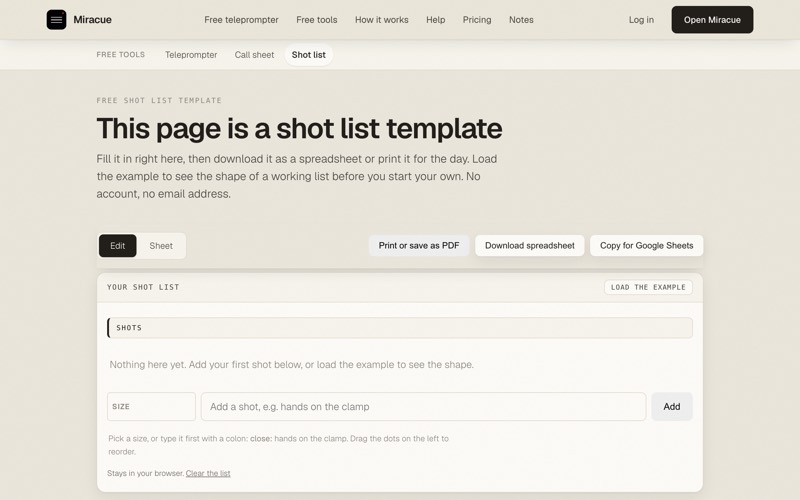
Free shot list template
Every shot you need for the day. Download it as a spreadsheet or print it.
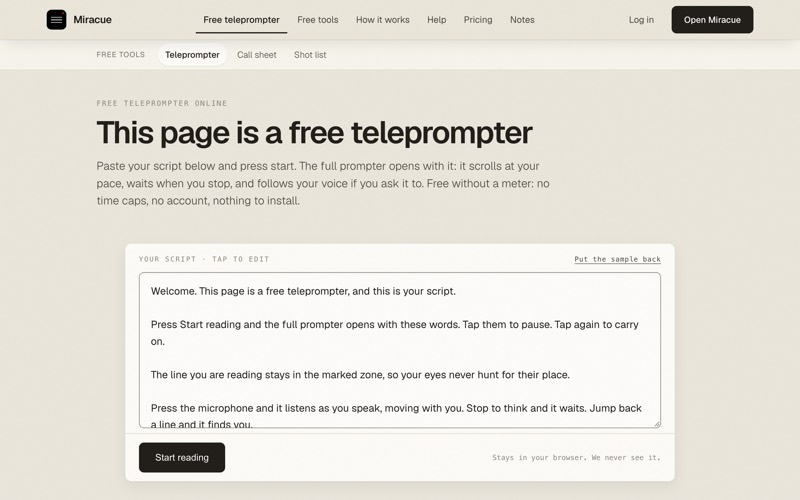
Miracue teleprompter
Paste your script and read it to camera, in the browser, with nothing to install.
Questions
Straight answers.
Is it really free?+
Yes. No trial, no account, no upgrade fee. Stow is free on macOS and Windows, and it stays that way.
Will there be a paid version?+
No. There is no paid tier planned and nothing is held back for one. The client-facing offload report ships free, in the app, today.
Does Stow change my card?+
Your footage is only ever read, never altered or deleted. There is one exception, and it is opt-in: if you turn on Wrap, Stow can write a small marker to a card once it has been verified, so a compatible camera offers a fresh format next time it goes in. It is off by default, it never touches your clips, and Unwrap puts the card straight back. The optional offload log in Settings also writes one small text file to the card. It is off by default too.
Can I set up several cards before anything copies?+
Yes. Nothing copies until you press Start copying in the queue. Set up each card, add it to the queue, then press Start copying once. A card you add while a run is going waits its turn.
Can two cards go to different drives?+
Yes. Every card has its own Copy to list, so the camera cards can go to the NAS and the sound card to an SSD in the same run. A new card starts with the last card's drives, so on most jobs you only set this once.
Where can I see what I offloaded last week?+
Open History at the top of the window. It lists every card this computer has offloaded, the verdict it got and the folder the footage went to.
Why two drives?+
One drive can fail. Two verified copies on two separate drives is the only state where losing a drive does not lose the footage. A single copy holds at amber until a second one verifies.
Is my footage uploaded anywhere?+
No. Copying, verification and camera detection all happen on your machine. There is no account, no cloud, and your footage never leaves the computer. Stow goes online only for the parts you choose to use: a small daily check for a new version, installing an update when you ask it to, and the optional phone alert, which goes through the ntfy service you configure. None of it carries anything about you or your footage, and the version check has an off switch in Settings.
How do updates work?+
When a new version is available, Stow tells you inside the app. You can install it from there, and your settings, reports and offloaded footage are left alone.
I have an Intel Mac.+
The current macOS build is for Apple Silicon, M1 and later. There is no Intel build at the moment; if that changes we will say so here.
Help shape Stow
How is Stow working for you?
Whatever you tell me here reaches me directly. A low rating is as useful as a high one: it is the fastest way to get something changed.
It comes straight to me.
Help shape Stow
We would like to hear how it goes.
Leave your address and you will hear when there is a new version, and first when we make something else for production. Reply and tell us what your shoots need next. Almost everything it does now started that way.
One email to confirm it is you, then nothing until there is something worth saying. Unsubscribe any time, and your address stays with us.
Free for macOS and Windows
Stop hoping the copy worked.
v0.7.4, a few MB, no account. The macOS build is for Apple Silicon.