What we learned clearing cards on our own shoots, why we built our own offload tool, and why it is free.
Blog post7 min read
At the end of a shoot, copying the cards is only half the job. The more important question is whether those copies have actually checked out before the originals are formatted.
For a lot of people the answer to that question has been a general file copier. On Windows that usually means TeraCopy, and there is now a Mac version as well. It is a good piece of software, and this is not an article about replacing it.
If you came here for a straight comparison, we have since run TeraCopy and Stow against the same card and deliberately corrupted a file to see whether either of them would miss it. Neither did. This piece is the other half: why we built Stow at all, and the rules it follows.
What TeraCopy is good at
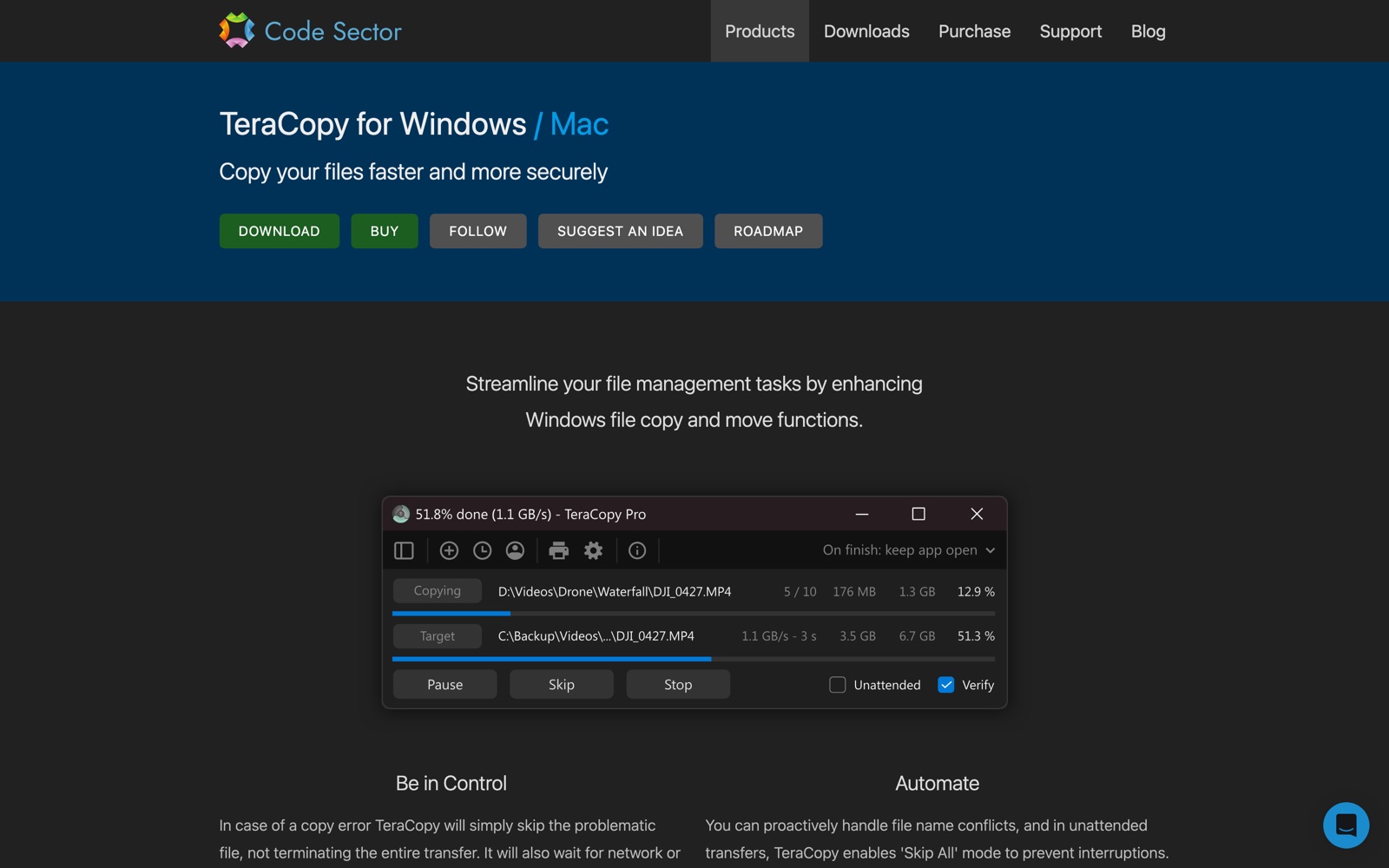
Credit where it is due. TeraCopy does the things Finder and Explorer should have done years ago. If a file fails, it skips it and carries on rather than abandoning the whole transfer, and it waits for a device or a network to come back rather than giving up. Afterwards you can retry only the files that failed. It verifies what it copied by comparing hashes of the source and the target, using MD5, SHA-1, SHA-256 or SHA-512 on the Mac. It handles name conflicts, keeps a history of transfers, copies to more than one destination, and the paid version writes reports.
For moving files from one place to another, it is better than the tool built into your operating system, and it has earned the audience it has.
TeraCopy, August 2026. The Mac version sits alongside the Windows original.
Where a camera card is a different job
A camera card is not a folder of files. It is the only copy of something that cannot be shot again, and it is about to be erased. That changes what the software is being asked to do.
It is a card, not a path. Footage arrives with a shape: the camera that shot it, a card number, a date, a client, a project. Filing that by hand at eleven at night is where mistakes live. A card offloader recognises the camera the card came from and builds the same folder tree every time, so that in two years the footage is where you expect it to be.
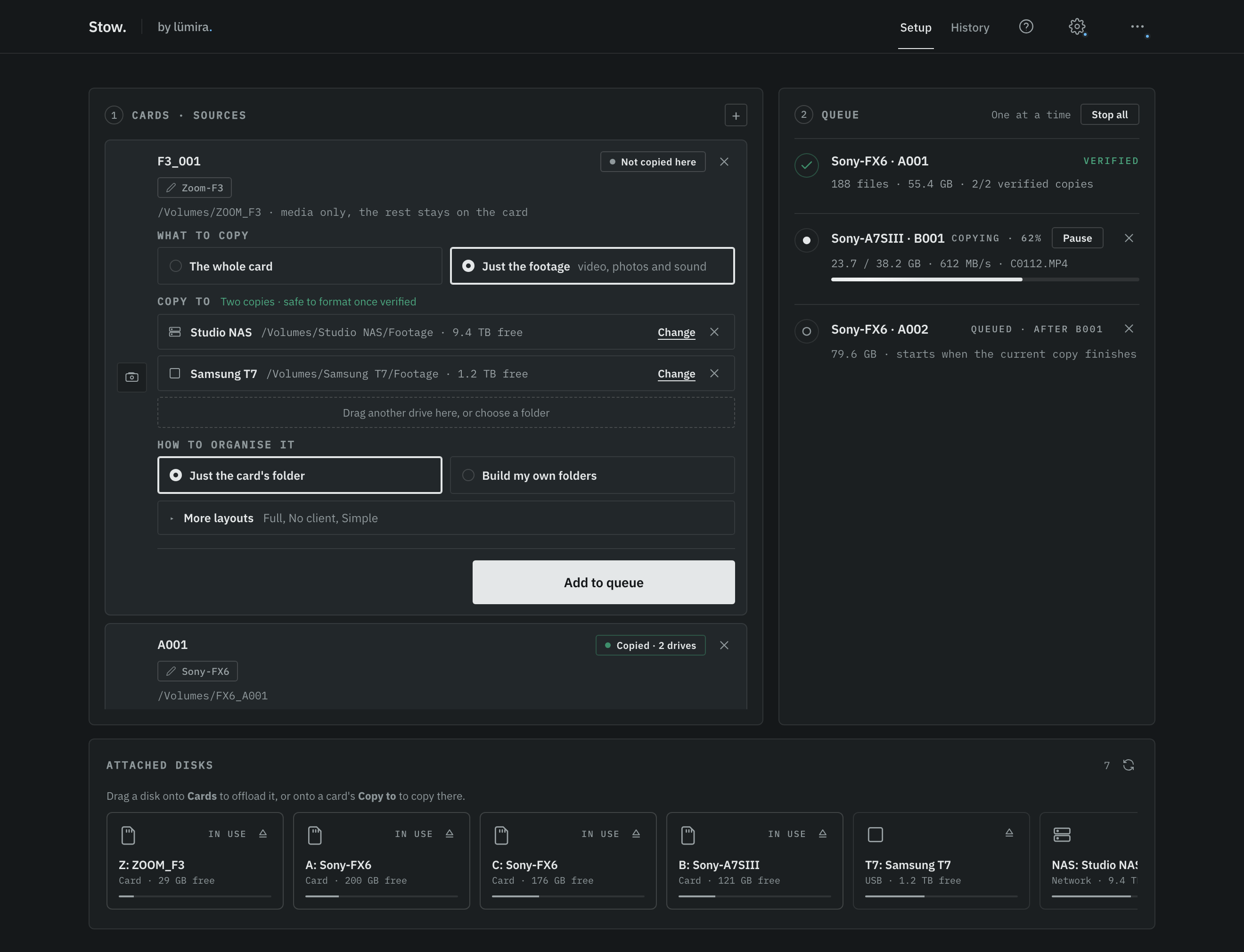
Stow: drag a card in, choose its drives, add it to the queue, press Start.
One pass, every drive. The safe habit is at least two copies on separate drives, and several tools can write to more than one destination. Stow writes to all of them in a single pass, so the card is read once rather than once per destination. You can add as many drives as the machine will take, and every one of them is verified. Two verified copies is the minimum that earns a green verdict, not the ceiling.
The card is read once, every destination is written and verified in the same pass, and the results become a single decision.
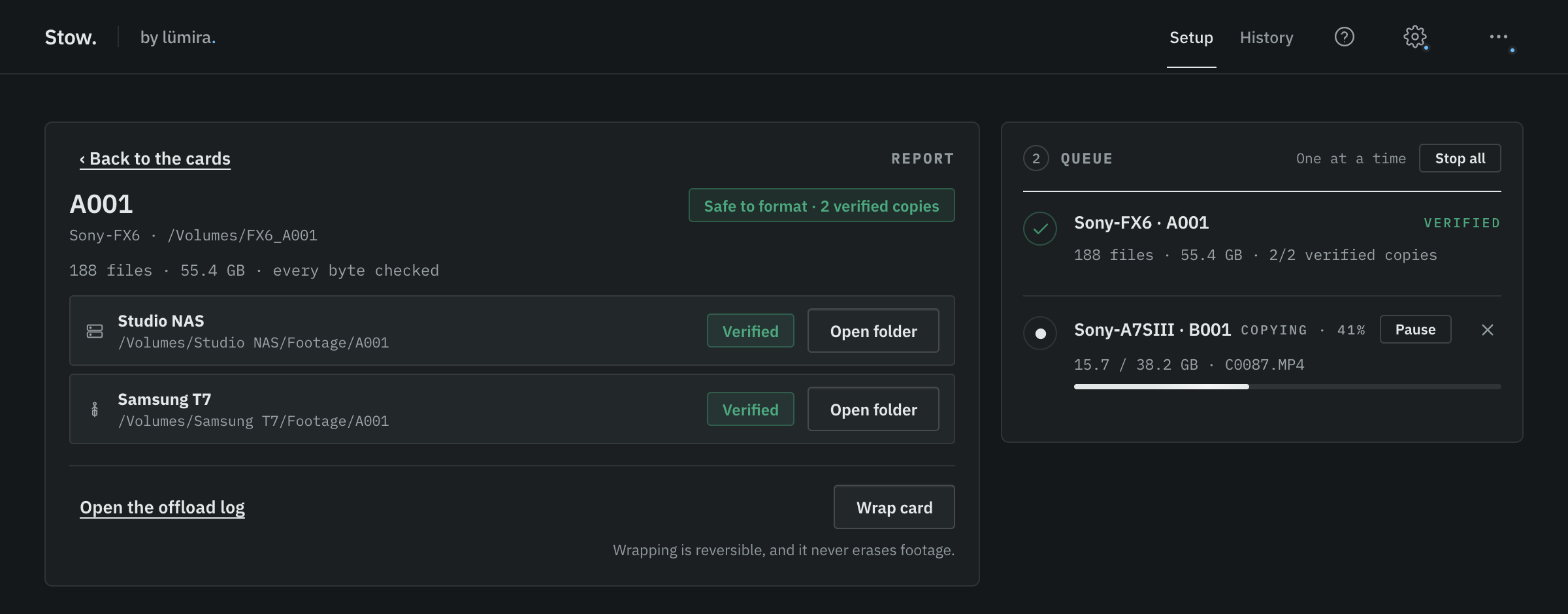
"Finished" is not "safe to format". This is the difference that matters most. A file copier reports on a transfer. What you need, standing there with the card in your hand, is an answer to a different question: can this card be formatted, or not yet. Answering that means holding the whole offload as one decision, taking the verification results from every drive together, and turning them into a single verdict for the card, including the case where one drive dropped out halfway and the other finished perfectly. That is a production decision rather than a file operation, and it is the job Stow was built to do.
Safe to format
Every file matched byte for byte on two or more separate drives.
Keep the cards
One verified copy only. A single drive failing would lose the footage, so the cards stay.
Do not format
Something did not verify. The app says so rather than rounding up to reassuring.
The three answers Stow will give. There is no fourth, softer one.
A note on what verifying means
Verification matters because a completed copy is not the same thing as a checked copy.
TeraCopy handles this properly. After copying, it can read the destination files again, calculate their checksums and compare them with the source.
Stow also runs a separate verification pass after the copy. It reads every finished file back from each destination and checks it against the source. The difference is what Stow then does with those results: it brings every destination together into one card-level decision, safe to format, or not yet.
Stow also writes an ASC MHL v2 manifest with every offload, listing the files and their checksums. That gives us something to verify against again later if the footage has been sitting in an archive.
A manifest is written with every offload, so the same footage can be checked against its own numbers years later. Illustrative extract.
Every destination, resolved into one decision about the card.
So we built one
We run a video production studio in Hertfordshire. We built Stow for our own studio, because it is a problem we hit on every shoot, and we made it free because plenty of people are in the same boat and there was no reason to keep it to ourselves.
It copies a card to two or more drives at the same time, reads every file back from each of those drives, compares it against the source, and then says one of two things: safe to format, or not yet. It recognises the camera the card came from and files the footage accordingly. It writes an ASC MHL v2 manifest for every offload. It runs natively on Mac and Windows, signed and notarised on both, and it is about five megabytes. There is no account, no sign-up wall and no advertising.
Why it is free, and stays free
The reason we keep Stow free is that we want more people to use it, push it in real production and tell us where it falls short.
A card offloader only earns trust by working everywhere. There are more camera models, card formats, readers, drive types, filesystems and studio habits in the world than any one company can own, let alone test against. The only way to find the edges is for a great many people to use the software on real jobs and tell us where it fell short. Every one of those reports makes the tool more solid for everybody else using it.
When we first looked into the idea, CrystalDiskMark and PureRef were two examples we kept coming back to. Their models are different, and PureRef's commercial licensing has since changed, but we liked the same underlying idea: build a specialist utility properly, make it easy for people to use, and let a broad user base help strengthen it over time.
That is the ambition for Stow: to make it solid enough to stand alongside the established paid tools, while keeping it free so more people can use it and the improvements benefit everyone.
The rules we use when deciding how Stow should behave
If you are going to trust software with the only copy of a day's work, you are entitled to know how it behaves when the news is bad.
A verdict is never softened. If a card did not fully verify, the app says do not format it. It does not round up to something reassuring.
A card that cannot be read is never hidden. It is shown and labelled likely damaged, do not format, because the alternative is a card that disappears from the list and gets formatted later.
We do not claim to be the fastest. We have not run the benchmarks that would let us say that fairly, so we say what is true instead: it reads the card once and writes to every drive you have given it.
Nothing about you, your computer or your footage is sent anywhere. No account, no telemetry, no analytics inside the app.
The preview can never show a green result. If the engine is not running, the app says preview rather than verified, because a false "safe to format" is the worst thing this software could ever do.
What Stow does not do
It does not do LUTs, colour management or clip grading, and it does not write to LTO. If your production needs those, the paid tools that provide them are worth their money and we would point you at them. It is a card offloader, and that is the whole of it.
And if what you need is to move files around, use TeraCopy. That is the job it is good at.
Built by a production company, shaped by the people who use it
Several of the things Stow does now began as a message from somebody using it. Copying more than one card at a time came from that. So did the choice of what happens when a card is plugged in mid-run, and a detection fix we would not have found on our own.
That is how we would like to carry on. If you work with camera cards and a real shoot needs something Stow does not do yet, tell us. Everything gets read, and when an idea ships you will see it in the changelog.
Questions people ask
Does TeraCopy work on Mac? Yes. Code Sector publishes a Mac version alongside the Windows original, and it verifies copies by comparing MD5, SHA-1, SHA-256 or SHA-512 hashes.
Is TeraCopy good for camera cards? It copies and verifies files well. Stow is designed specifically around the camera-card workflow: recognising the camera and card, organising the footage consistently, and combining the verification results from every chosen destination into one clear card-level verdict.
What is the difference between a file copier and a card offloader? A file copier reports on a transfer. A card offloader files footage by camera and card, writes to two or more drives in one pass, reads every file back from the drive to verify it, writes a manifest for later re-checking, and gives one verdict for the card: safe to format, or not yet.
How many drives can Stow copy to at once? As many as the computer supports. Two verified copies on separate drives is the minimum for a safe-to-format verdict, not the maximum.
Is Stow really free? Yes, with no paid tier, no account and no advertising.
The short version: a file copier tells you a transfer finished. A card offloader files the footage by camera and card, writes to every drive you choose in one pass, verifies each of them, and gives you one answer about the card in your hand.
We make Stow, and it appears in this article. Everything stated about TeraCopy comes from Code Sector's own pages on the day of writing. If something here has gone out of date, tell us and we will correct it.
Stow is free, and stays free
Copies a card to two or more drives at once, verifies every file, and tells you when it is safe to format. Mac and Windows.